Chapter 4 Kerberos Authentication (krb5)
asn1.py — Kerberos Packet Formats (AS/TGS/AP)
asn1.py defines the packet formats of the Kerberos request / response types, such as AS_REQ, AS_REP, TGS_REQ and TGS_REP.
class AS_REP(KDC_REP):
    tagSet = _application_tag(constants.ApplicationTagNumbers.AS_REP.value)

class TGS_REP(KDC_REP):
    tagSet = _application_tag(constants.ApplicationTagNumbers.TGS_REP.value)
The structures you encounter most often in Kerberos authentication:
AS_REP, TGS_REQ, AP_REQ, TGS_REP, Authenticator (authentication), EncASRepPart (encrypted part of the AS exchange), AuthorizationData, etc.
For concrete usage, look at the Kerberos-related scripts under examples (getST, ticketer, ...): they show how each stage of the ticket flow constructs and populates the asn1.py structures.
# eg.impacket/examples/goldenPac.py
   def getKerberosTGS(self, serverName, domain, kdcHost, tgt, cipher, sessionKey, authTime):
        ......
        # Key Usage 4
        # TGS-REQ KDC-REQ-BODY AuthorizationData, encrypted with
        # the TGS session key (Section 5.4.1)
        encryptedEncodedIfRelevant = cipher.encrypt(sessionKey, 4, encodedIfRelevant, None)

        tgsReq = TGS_REQ()
        reqBody = seq_set(tgsReq, 'req-body')

        opts = list()
        opts.append( constants.KDCOptions.forwardable.value )
        opts.append( constants.KDCOptions.renewable.value )
        opts.append( constants.KDCOptions.proxiable.value )

        reqBody['kdc-options'] = constants.encodeFlags(opts)
        seq_set(reqBody, 'sname', serverName.components_to_asn1)
        reqBody['realm'] = decodedTGT['crealm'].prettyPrint()

        now = datetime.datetime.utcnow() + datetime.timedelta(days=1)

        reqBody['till'] = KerberosTime.to_asn1(now)
        reqBody['nonce'] = random.SystemRandom().getrandbits(31)
        seq_set_iter(reqBody, 'etype', (cipher.enctype,))
        reqBody['enc-authorization-data'] = noValue
        reqBody['enc-authorization-data']['etype'] = int(cipher.enctype)
        reqBody['enc-authorization-data']['cipher'] = encryptedEncodedIfRelevant

        apReq = AP_REQ()
        apReq['pvno'] = 5
        apReq['msg-type'] = int(constants.ApplicationTagNumbers.AP_REQ.value)

        opts = list()
        apReq['ap-options'] =  constants.encodeFlags(opts)
        seq_set(apReq,'ticket', ticket.to_asn1)

        authenticator = Authenticator()
        authenticator['authenticator-vno'] = 5
        authenticator['crealm'] = decodedTGT['crealm'].prettyPrint()

        clientName = Principal()
        clientName.from_asn1( decodedTGT, 'crealm', 'cname')

        seq_set(authenticator, 'cname', clientName.components_to_asn1)

        now = datetime.datetime.utcnow()
        authenticator['cusec'] =  now.microsecond
        authenticator['ctime'] = KerberosTime.to_asn1(now)

        encodedAuthenticator = encoder.encode(authenticator)
        ......
constants.py — Kerberos Enum Constants (flags / error_code)
Holds the static enumerations used during Kerberos authentication — flags, error codes, principal types and so on — convenient to reference while authenticating.
# eg.examples/GetUserSPNs.py
......
from impacket.examples import logger
from impacket.examples.utils import parse_credentials
from impacket.krb5 import constants
        # No TGT in cache, request it
        userName = Principal(self.__username, type=constants.PrincipalNameType.NT_PRINCIPAL.value)
# eg.krb5/constants.py
class PrincipalNameType(Enum):
    NT_UNKNOWN              = 0
    NT_PRINCIPAL            = 1
    NT_SRV_INST             = 2
    NT_SRV_HST              = 3
    NT_SRV_XHST             = 4
    NT_UID                  = 5
    NT_X500_PRINCIPAL       = 6
    NT_SMTP_NAME            = 7
    NT_ENTERPRISE           = 10
    NT_WELLKNOWN            = 11
    NT_SRV_HST_DOMAIN       = 12
    NT_MS_PRINCIPAL         = -128
    NT_MS_PRINCIPAL_AND_ID  = -129
    NT_ENT_PRINCIPAL_AND_ID = -130
keytab.py — Key Table File Parsing & Saving
As the name suggests, this file contains the classes and functions for parsing and saving keytab files. A keytab is a key table holding the keys of Principals; it plays roughly the same role as the id_rsa private key in SSH authentication, allowing passwordless Kerberos verification. It usually lives under /etc/security/keytabs/ (e.g. nn.service.keytab). Take generating and using a keytab on CDH as an example:
 1. Enter kerberos admin

  kadmin.local

2. List kerberos principals

listprincs

3. Add kerberos principal

kadmin -p 'kdcadmin/admin' -w "-s" -q 'addprinc -randkey hive'

4. Generate keytab file

ktadd -k   /home/kerberos/hive.keytab -norandkey hive@TEST.COM

5. Authenticate with the generated keytab

kinit -kt  /home/kerberos/hive.keytab hive/bdp4@TEST.COM

6. Show current authenticated user

klist

7. Remote access via beeline

beeline -u "jdbc:hive2://1*92.168.86.130:10000/default;principal=hive/bdp4@TEST.COM"
The keytab file format is as follows:
 keytab {
      uint16_t file_format_version;                    /* 0x502 */
      keytab_entry entries[*];
  };

  keytab_entry {
      int32_t size;
      uint16_t num_components;    /* sub 1 if version 0x501 */
      counted_octet_string realm; realm
      counted_octet_string components[num_components]; principal name
      uint32_t name_type;   /* not present if version 0x501 */ principal type
      uint32_t timestamp; timestamp
      uint8_t vno8; key version
      keyblock key;
      uint32_t vno; /* only present if >= 4 bytes left in entry */
  };

  counted_octet_string {
      uint16_t length;
      uint8_t data[length];
  };

  keyblock {
      uint16_t type; encryption type
      counted_octet_string;encryption key
  };
The getData() and getKey() functions of the keytab class show how the keytab file structure is parsed and its values extracted.
ccache.py — Credential Cache Parsing (toTGT / toTGS)
As seen in Chapter 2's structure.py, ccache.py parses the Kerberos credential-cache binary file (ccache); the Credential class provides toTGT, toTGS and friends. First look at the ccache file structure:
ccache {
          uint16_t file_format_version; /* 0x0504 */ file format version
          uint16_t headerlen;           /* only if version is 0x0504 */
          header headers[];             /* present only in 0x0504 and above */
          principal primary_principal;
          credential credentials[*];
};

# the header structure is "tag + taglen + tagdata"; the most common tag is DeltaTime (0x0001),
# whose tagdata holds time_offset / usec_offset — the skew between local clock and KDC

credential {
            principal client; client block
            principal server; server block
            keyblock key; key block
            times    time; time block (authtime / starttime / endtime / renew_till)
            uint8_t  is_skey;   whether skey    /* 1 if skey, 0 otherwise */
            uint32_t tktflags;           /* stored in reversed byte order */
            uint32_t num_address;
            address  addrs[num_address]; address block
            uint32_t num_authdata;
            authdata authdata[num_authdata]; authorization data
            counted_octet_string ticket; the ticket
            counted_octet_string second_ticket; second ticket, related via DUPLICATE-SKEY or ENC-TKT-IN-SKEY
};

keyblock {
          uint16_t keytype; encryption type
          uint16_t etype;                /* only present if version 0x0503 */
          uint16_t keylen;
          uint8_t keyvalue[keylen]; the key
};

principal {
           uint32_t name_type;           /* not present if version 0x0501 */
           uint32_t num_components;      /* sub 1 if version 0x501 */
           counted_octet_string realm; realm
           counted_octet_string components[num_components]; user/service name
};

# times / address / authdata / counted_octet_string sub-structures omitted:
# all follow the two-part "type field + counted_octet_string (length + data)" layout
The existence of the second ticket is puzzling at first sight; after digging through many docs, its use case turned up in IBM's system-programming documentation: https://www.ibm.com/docs/en/zos/2.3.0?topic=kpi-krb5-get-cred-from-kdc-obtain-kdc-server-service-ticket
#include <skrb/krb5.h>
krb5_error_code krb5_get_cred_from_kdc (
    krb5_context                         context,
    krb5_ccache                          ccache,
    krb5_creds *                         in_cred,
    krb5_creds **                        out_cred,
    krb5_creds ***                       tgts
);
Input
context
Specifies the Kerberos context.
ccache
Specifies the credentials cache. The initial TGT for the local realm must already be in the cache. The Kerberos runtime obtains additional ticket-granting tickets as needed if the target server is not in the local realm.
in_cred
Specifies the request credentials. The client and server fields must be set to the desired values for the service ticket. The second_ticket field must be set if the service ticket is to be encrypted in a session key. The ticket expiration time can be set to override the default expiration time.
ifinsessionthenmustsetssecond_ticket
Output
out_cred
Returns the service ticket. The krb5_free_creds() routine should be called to release the credentials when they are no longer needed.
tgts
Returns any new ticket-granting tickets that were obtained while getting the service target from the KDC in the target realm. There may be ticket-granting tickets returned for this parameter even if the Kerberos runtime was ultimately unable to obtain a service ticket from the target KDC. The krb5_free_tgt_creds() routine should be called to release the TGT array when it is no longer needed.
Do not conflate two concepts: IBM's second_ticket is an input field of krb5_get_cred_from_kdc(), required only in special scenarios such as binding a service ticket to a session key; impacket's CCache.secondTicket is a local structure field used while parsing / saving a ccache. fromKRBCRED() initializes it to empty merely because the current implementation never reads that content — it does not mean the IBM API semantics default it to empty:
    def fromKRBCRED(self, encodedKrbCred):
        .........
        credential.ticket['length'] = len(credential.ticket['data'])
        credential.secondTicket = CountedOctetString()
        credential.secondTicket['data'] = b''
        credential.secondTicket['length'] = 0
Within impacket, this class is mainly used to read or save ccache files; the important functions are:
def toKRBCRED(self):
def fromKRBCRED(self, encodedKrbCred):
def loadKirbiFile(cls, fileName):
def saveKirbiFile(self, fileName):
def fromTGS(self, tgs, oldSessionKey, sessionKey):
def fromTGT(self, tgt, oldSessionKey, sessionKey):
def getCredential(self, server, anySPN=True):
as in the following example:
# eg./examples/getTGT.py
  def saveTicket(self, ticket, sessionKey):
        logging.info('Saving ticket in %s' % (self.__user + '.ccache'))
        from impacket.krb5.ccache import CCache
        ccache = CCache()

        ccache.fromTGT(ticket, sessionKey, sessionKey)
        ccache.saveFile(self.__user + '.ccache')
types.py — Principal & Other Auth Data Handlers
Mostly the handler classes for data used throughout Kerberos authentication: KerberosException, Principal, Address, EncryptedData, Ticket, KerberosTime. The most important one is Principal (the authentication principal). It consists of three parts — primary (user / service name), instance (service instance name) and realm (domain name). primary and instance are separated by /, instance and realm by @, as in joe/admin@EXAMPLE.COM or joe/node2.example.com.
Principal is parsed as follows:
class Principal(object):
    """The principal's value can be supplied as:
* a single string
* a sequence containing a sequence of component strings and a realm string
* a sequence whose first n-1 elemeents are component strings and whose last
  component is the realm

If the value contains no realm, then default_realm will be used."""
    def __init__(self, value=None, default_realm=None, type=None):
        ......

        elif isinstance(value, str):
            # string form: the regex splits out the realm (after @) and the components (slash-separated, \ escaping supported)
            m = re.match(r'((?:[^\\]|\\.)+?)(@((?:[^\\@]|\\.)+))?$', value)
            if not m:
                raise KerberosException("invalid principal syntax")

            def unquote_component(comp):
                return re.sub(r'\\(.)', r'\1', comp)

            if m.group(2) is not None:
                self.realm = unquote_component(m.group(3))
            else:
                self.realm = default_realm

            self.components = [
                unquote_component(qc)
                for qc in re.findall(r'(?:[^\\/]|\\.)+', m.group(1))]
        elif len(value) == 2:
            ......

    # __eq__ / __str__ / __repr__ and friends omitted.
    # from_asn1 and components_to_asn1 convert Principal to/from asn1 structures
    # and are used heavily in getKerberosTGT / getKerberosTGS (see the kerberosv5.py section)
In getST we can see how a Principal is assigned:
principal = ccache.credentials[0].header['server'].prettyPrint()
crypto.py — Kerberos Enctype Implementations (RC4 / AES)
Implements encryption / decryption and key derivation (string_to_key) for the Kerberos enctypes (RC4-HMAC, AES128/256-CTS-HMAC-SHA1, etc.); MD4 / MD5 support the RC4 family.
By the way, the impacket root directory holds another crypto.py of the same name implementing generic algorithms such as AES-CMAC-PRF-128 and AES-CMAC; smb3.py and ccache.py both import from these two crypto modules, and secretsdump.py uses both. They have different jobs: krb5/crypto.py serves the Kerberos enctypes, while the root crypto.py serves generic protocol needs (e.g. AES-CMAC for SMB3 signing).
# eg.impacket/krb5/ccache.py
from impacket.krb5 import crypto, constants, types
    .......
        seq_set(tgt_rep,'ticket', ticket.to_asn1)
        cipher = crypto._enctype_table[self['key']['keytype']]()
        tgt = dict()
        tgt['KDC_REP'] = encoder.encode(tgt_rep)

# eg.impacket/smb3.py
from Cryptodome.Cipher import AES
from impacket import nmb, ntlm, uuid, crypto
    ........
            if len(self._Session['SessionKey']) > 0:
                p = packet.getData()
                signature = crypto.AES_CMAC(self._Session['SigningKey'], p, len(p))
gssapi.py — GSS-API Wrapper (MIC / WRAP)
GSS-API is the industry-standard security API defined in RFC 2743, commonly used for Kerberos authentication of services such as MongoDB, PostgreSQL and FTP. It helps to distinguish GSS-API from the Kerberos protocol itself: GSS-API stands for Generic Security Services Application Program Interface — an API specification, i.e. the programming interface defined when implementing the Kerberos protocol.
The dominant GSS-API mechanism implementation in use is Kerberos. Unlike the GSS-API, the Kerberos API has not been standardized and various existing implementations use incompatible APIs. The GSS-API allows Kerberos implementations to be API compatible.
Meaning: with this specification, as long as vendors implement Kerberos to spec, at minimum any client can talk to any vendor's KDC, and conversely a server can serve clients of any implementation.
In short: Kerberos is the authentication protocol designed by cryptographers, GSS-API is the programming interface architects defined to implement it, and vendors such as MIT Kerberos and Windows AD achieve API-level compatibility by implementing GSS-API — that is, Kerberos protocol communication on top of GSS-API. SPNEGO (Simple and Protected GSS-API Negotiation, RFC 4178), in turn, is a mechanism for negotiating which GSS-API mechanism (e.g. Kerberos or NTLM) is actually used; Microsoft relies on it heavily in SMB and HTTP authentication to pass Windows credentials around.
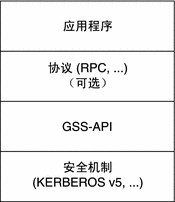
The concrete protocol standard: https://datatracker.ietf.org/doc/html/rfc4121 — The Kerberos Version 5 Generic Security Service Application Program Interface (GSS-API) Mechanism: Version 2.
gssapi.py implements GSS-API for both the RC4 and AES encryption forms.
The MIC structure is the Message Integrity Code, used for tamper protection. A client can explicitly disable it by sending ISC_REQ_NO_INTEGRITY; alternatively, whether message-integrity checking is enabled is decided server-side by NegpDetermineTokenPackage on the first InitializeSecurityContext call — if the initial token is an NTLM or Kerberos token, ISC_REQ_INTEGRITY will not be turned on; if the initiator is SMB, the flag defaults to 1 and the server signs. CVE-2019-1040 bypasses the NTLM MIC protection and lets us flip these flags so the server skips LDAP signing (classic combos: Exchange + CVE-2019-1040 for full-domain takeover, or RBCD + PrinterBug/PetitPotam + CVE-2019-1040).
The WRAP structure provides confidentiality: once the GSS-API initial token establishes the context, subsequent traffic is encrypted/decrypted via wrap / unwrap.
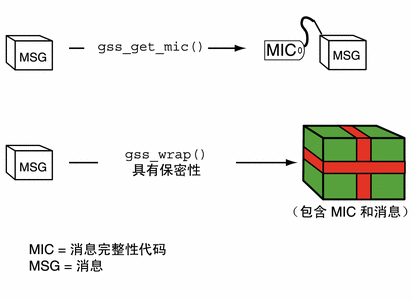
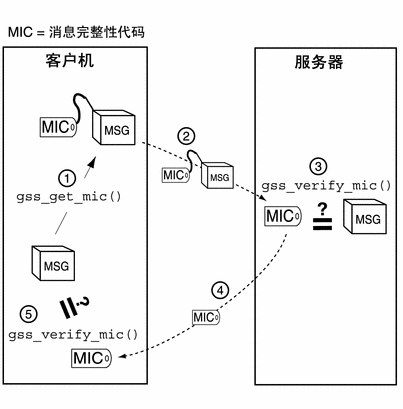
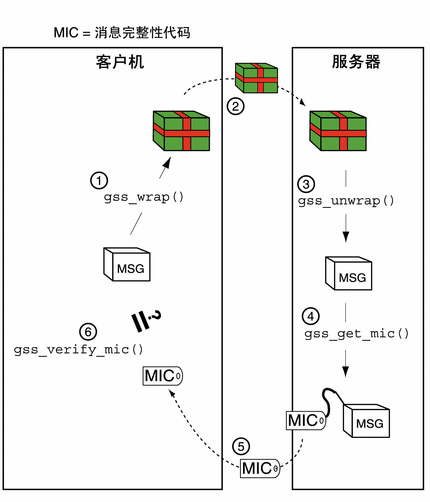
The key GSS-API C functions are (note the real API uses the all-lowercase gss_ prefix):
gss_acquire_cred     Obtains the user's identity proof, often a secret cryptographic key
gss_import_name      Converts a username or hostname into a form that identifies a security entity
gss_init_sec_context Generates a client token to send to the server, usually a challenge
gss_accept_sec_context Processes a token from gss_init_sec_context and can generate a response token to return
gss_wrap             Converts application data into a secure message token (typically encrypted)
gss_unwrap           Converts a secure message token back into application data
Typical steps for using GSS-API:
-
Each application (initiator or acceptor) explicitly acquires credentials unless the credentials were acquired automatically, using gss_acquire_cred() or gss_add_cred().
-
The initiator starts a security context and the acceptor accepts it. gss_init_sec_context() establishes the context between the application and the remote server; on success it returns a context handle plus a context-level token to send to the acceptor. Before calling gss_init_sec_context() the client should:
-
Acquire credentials with gss_acquire_cred() if needed — normally the client receives credentials at login; gss_acquire_cred() can only retrieve initial credentials from the running OS.
- Import the server name into GSS-API internal form with gss_import_name(). For more on names and gss_import_name(), see Names in GSS-API.
When calling gss_init_sec_context(), the client typically passes:
GSS_C_NO_CREDENTIALfor cred_handle, meaning default credentialsGSS_C_NULL_OIDfor mech_type, meaning the default mechanismGSS_C_NO_CONTEXTfor context_handle, meaning the initially empty context. Since gss_init_sec_context() is usually called in a loop, later calls pass the handle returned earlierGSS_C_NO_BUFFERfor input_token, meaning an initially empty token; alternatively a pointer to a gss_buffer_desc whose length field is zero- The server name imported into GSS-API internal form with gss_import_name().
- The context acceptor may require several handshakes before the context is fully established — the acceptor asks the initiator to send several pieces of context information first. For portability, always initiate the context inside a loop that checks whether the context is fully established.
-
The other side of context establishment is accepting it, via gss_accept_sec_context(). Usually the server accepts the context the client started with gss_init_sec_context(). Output tokens are returned by gss_accept_sec_context() and fed back in as input tokens on later calls; when there is nothing more to send to the initiator, the function returns a zero-length output token. Besides checking the return status, the loop should check the output token length to see whether more tokens must be sent; before the loop, initialize the output token length to zero (use
GSS_C_NO_BUFFERor zero the structure's length field). -
The sender applies security protection to the data being transferred — encrypting the message or tagging it with an identifier token — then transmits the protected message.
------.
Note –.
The sender may choose to apply no protection, in which case the message gets only the default GSS-API security service, i.e. verification.
------:
-
The acceptor decrypts the message as needed and verifies it where appropriate.
-
(Optional) The acceptor returns the identifier token to the sender for confirmation.
-
Both applications destroy the shared security context; storage routines may release any remaining GSS-API data.
What impacket mainly uses from gssapi.py are its static variables:
# eg.impacket/krb5/kerberosv5.py
from impacket.krb5.gssapi import CheckSumField, GSS_C_DCE_STYLE, GSS_C_MUTUAL_FLAG, GSS_C_REPLAY_FLAG,

gssapi.py
# Constants
GSS_C_DCE_STYLE     = 0x1000
GSS_C_DELEG_FLAG    = 1
GSS_C_MUTUAL_FLAG   = 2
GSS_C_REPLAY_FLAG   = 4
GSS_C_SEQUENCE_FLAG = 8
GSS_C_CONF_FLAG     = 0x10
GSS_C_INTEG_FLAG    = 0x20

# Mic Semantics
GSS_HMAC = 0x11
# Wrap Semantics
GSS_RC4  = 0x10

# 2.  Key Derivation for Per-Message Tokens
KG_USAGE_ACCEPTOR_SEAL  = 22
KG_USAGE_ACCEPTOR_SIGN  = 23
KG_USAGE_INITIATOR_SEAL = 24
KG_USAGE_INITIATOR_SIGN = 25

KRB5_AP_REQ = struct.pack('<H', 0x1)

# 1.1.1. Initial Token - Checksum field
class CheckSumField(Structure):
    structure = (
        ('Lgth','<L=16'),
        ('Bnd','16s=b""'),
        ('Flags','<L=0'),
    )
spnego.py (in the impacket root directory)
A quick look at SPNEGO while we are here. One clarification first: SPNEGO is not "Microsoft's extension of Kerberos" — it is an IETF GSS-API negotiation mechanism (RFC 4178) by which client and server agree on which security mechanism (e.g. Kerberos or NTLM) to actually use; Microsoft uses it pervasively in SMB, HTTP authentication and elsewhere.
The Kerberos authentication flow:
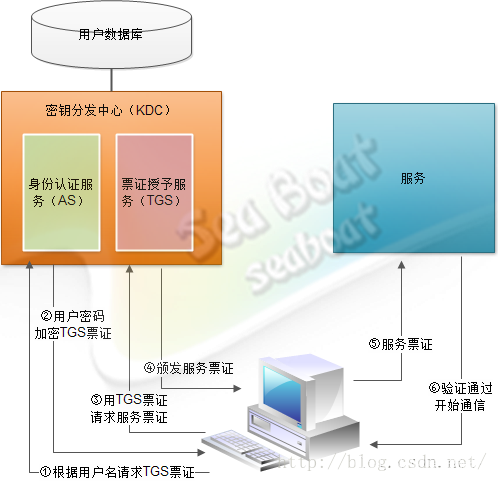
The SPNEGO authentication flow:

- First, the user logs on to the Microsoft domain controller
MYDOMAIN.EXAMPLE.COMfrom a workstation. - The user then tries to access a web application, requesting a protected resource with the browser, which sends an
HTTP GETto the Liberty server. - SPNEGO authentication on the Liberty server answers with an
HTTP 401challenge carrying theWWW-Authenticate: Negotiateheader. - The browser recognizes the negotiate header because it is configured for integrated Windows authentication. It resolves the requested URL's host name, builds the target Kerberos SPN
HTTP/myLibertyMachine.example.com, and requests a Kerberos service ticket from the Microsoft KDC (TGS_REQ). TheTGSreturns the service ticket (TGS_REP). The service ticket (the SPNEGO token) proves the user's identity and authorization for the service (the Liberty server). - The browser then answers the Liberty server's negotiate challenge with the SPNEGO token obtained in the previous step, placed in the
Authorizationheader. - SPNEGO authentication on the Liberty server sees the SPNEGO token in the HTTP header, validates it and extracts the user's identity (principal).
- After obtaining the identity, the Liberty server validates the user against its user registry and performs authorization checks.
- If access is granted, the Liberty server responds with
HTTP 200and includes an LTPA cookie for subsequent requests.
Within impacket, the commonly used pieces are SPNEGO_NegTokenInit, TypesMech, SPNEGO_NegTokenResp and ASN1_AID — mostly in ntlmrelayx relay attacks. Per https://learn.microsoft.com/en-us/openspecs/windows_protocols/ms-smb2/06451bf2-578a-4b9d-94c0-8ce531bf14c4 , SMB invokes MS-SPNG (SPNEGO) to authenticate users:
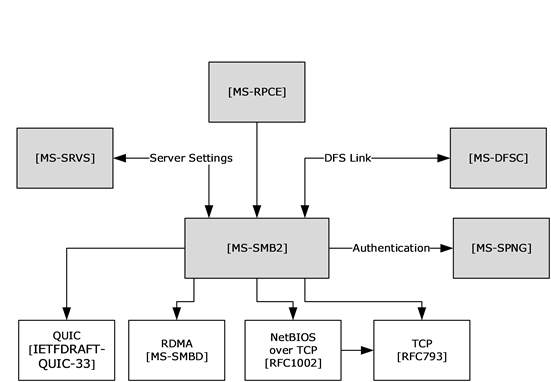
The authentication flow:
In spnego.py, the SPNEGO_NegTokenInit and SPNEGO_NegTokenResp classes are likewise the ones used to parse and modify SMB auth requests:
# eg./impacket/examples/ntlmrelayx/clients/smtprelayclient.py
from impacket.spnego import SPNEGO_NegTokenResp
......
    def sendAuth(self, authenticateMessageBlob, serverChallenge=None):
        if unpack('B', authenticateMessageBlob[:1])[0] == SPNEGO_NegTokenResp.SPNEGO_NEG_TOKEN_RESP:
            respToken2 = SPNEGO_NegTokenResp(authenticateMessageBlob)
            token = respToken2['ResponseToken']
        else:
            token = authenticateMessageBlob
        auth = base64.b64encode(token)
        self.session.putcmd(auth)
        typ, data = self.session.getreply()
        if typ == 235:
            self.session.state = 'AUTH'
            return None, STATUS_SUCCESS
        else:
            LOG.error('SMTP: %s' % ''.join(data))
            return None, STATUS_ACCESS_DENIED
kerberosv5.py — getKerberosTGT / getKerberosTGS Auth Flow
The most important functions in this file are getKerberosTGT and getKerberosTGS — the heart of the Kerberos authentication flow.
getKerberosTGT first initializes an AS_REQ, sets the header fields such as pvno and msg-type, then fills in req-body fields such as sname and cname:
def getKerberosTGT(clientName, password, domain, lmhash, nthash, aesKey='', kdcHost=None, requestPAC=True):
    ....
    asReq = AS_REQ()
    domain = domain.upper()
    serverName = Principal('krbtgt/%s'%domain,
    type=constants.PrincipalNameType.NT_PRINCIPAL.value)
    ....
    asReq['pvno'] = 5
    asReq['msg-type'] =  int(constants.ApplicationTagNumbers.AS_REQ.value)
    ....
    reqBody = seq_set(asReq, 'req-body')
    ....
    reqBody['till'] = KerberosTime.to_asn1(now)
    reqBody['rtime'] = KerberosTime.to_asn1(now)
    ....
            if aesKey != b'':
            if len(aesKey) == 32:
                supportedCiphers = (int(constants.EncryptionTypes.aes256_cts_hmac_sha1_96.value),)
                .....
After the aesKey is set, the request goes out via sendReceive. Since the first request carries no pre-authentication data (preAuth=False), a KDC that requires pre-auth returns a KRB_ERROR:
    try:
        r = sendReceive(message, domain, kdcHost)
        ....
    try:
        asRep = decoder.decode(r, asn1Spec = KRB_ERROR())[0]
        ....
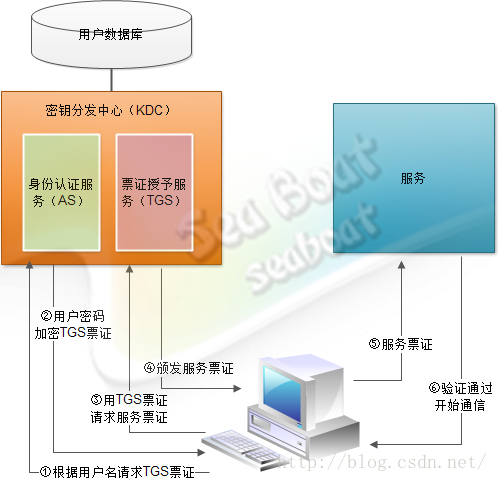
Next the timestamp is encrypted with the user key (derived from the NTLM hash / AES key) and a new AS_REQ with PADATA is built:
    if isinstance(nthash, bytes) and nthash != b'':
        key = Key(cipher.enctype, nthash)
    elif aesKey != b'':
        key = Key(cipher.enctype, aesKey)
    else:
        key = cipher.string_to_key(password, encryptionTypesData[enctype], None)

    if preAuth is True:
        if enctype in encryptionTypesData is False:
            raise Exception('No Encryption Data Available!')

        # Let's build the timestamp
        timeStamp = PA_ENC_TS_ENC()

        now = datetime.datetime.utcnow()
        timeStamp['patimestamp'] = KerberosTime.to_asn1(now)
        timeStamp['pausec'] = now.microsecond

        # Encrypt the shyte
        encodedTimeStamp = encoder.encode(timeStamp)

        # Key Usage 1
        # AS-REQ PA-ENC-TIMESTAMP padata timestamp, encrypted with the
        # client key (Section 5.2.7.2)
        encriptedTimeStamp = cipher.encrypt(key, 1, encodedTimeStamp, None)

        encryptedData = EncryptedData()
        encryptedData['etype'] = cipher.enctype
        encryptedData['cipher'] = encriptedTimeStamp
        encodedEncryptedData = encoder.encode(encryptedData)

        # Now prepare the new AS_REQ again with the PADATA
        # ToDo: cannot we reuse the previous one?
        asReq = AS_REQ()

        asReq['pvno'] = 5
        asReq['msg-type'] =  int(constants.ApplicationTagNumbers.AS_REQ.value)

        asReq['padata'] = noValue
        asReq['padata'][0] = noValue
        asReq['padata'][0]['padata-type'] = int(constants.PreAuthenticationDataTypes.PA_ENC_TIMESTAMP.value)
        asReq['padata'][0]['padata-value'] = encodedEncryptedData

        asReq['padata'][1] = noValue
        asReq['padata'][1]['padata-type'] = int(constants.PreAuthenticationDataTypes.PA_PAC_REQUEST.value)
        asReq['padata'][1]['padata-value'] = encodedPacRequest
......
The function simply returns the AS_REP packet as the tgt variable. The getTGT example script then calls getKerberosTGT and uses ccache.py's fromTGT to extract the ticket from the reply and save it as a ccache file:
# eg./examples/getTGT.py


def run(self):
        userName = Principal(self.__user, type=constants.PrincipalNameType.NT_PRINCIPAL.value)
        tgt, cipher, oldSessionKey, sessionKey = getKerberosTGT(userName, self.__password, self.__domain,unhexlify(self.__lmhash),unhexlify(self.__nthash), self.__aesKey,self.__kdcHost)
        self.saveTicket(tgt,oldSessionKey)

    def saveTicket(self, ticket, sessionKey):
        logging.info('Saving ticket in %s' % (self.__user + '.ccache'))
        from impacket.krb5.ccache import CCache
        ccache = CCache()

        ccache.fromTGT(ticket, sessionKey, sessionKey)
        ccache.saveFile(self.__user + '.ccache')
Of course the function returns more than the raw AS_REP — it also decrypts the session key with the user key:
    try:
        plainText = cipher.decrypt(key, 3, cipherText)
        encASRepPart = decoder.decode(plainText, asn1Spec = EncASRepPart())[0]
         # Get the session key and the ticket
        cipher = _enctype_table[encASRepPart['key']['keytype']]
        sessionKey = Key(cipher.enctype,encASRepPart['key']['keyvalue'].asOctets())

.......
    if isinstance(nthash, bytes) and nthash != b'':
        key = Key(cipher.enctype, nthash)
Now let's see what the AS_REQ header and req-body actually contain:
1.pvno Kerberos protocol version
2.msg-type message typeKRB_AS_REQ(0x0a)
3.PA_DATA Pre-authentication Data,pre-authentication data,each auth message has type and value。
PA-DATA PA-ENC-TIMESTAMP userHASHtimestamp
    padata-type: padata type
        padata-value: padata value
            etype:  encryption type
            cipher: encrypted value
PA-DATA PA-PAC-REQUEST:PAC extension
    padata-type: padata type
        padata-value: padata value
        include-pac: whether to include PAC,if included, PAC is returned in the response
4.req-body request body
padding:padding
kdc-options:KDC option settings
cname: client username
realm: realm
sname: server username,in AS_REQ sname is krbtgt,type is KRB_NT_SRV_INST
till: expiry timerubeuskekeo20370913024805Zcan be used as detection signature
nonce:randomly generated number,for replay detection
etype: encryption typeKDC selects encryption per etype
In the AS_REP reply you can see the TGT and the session key encrypted with the user key (enc-part).
Next, the getKerberosTGS function.
It builds a TGS_REQ from the supplied TGT and session key (the AP_REQ carries the TGT plus an Authenticator encrypted under the session key):
    try:
        decodedTGT = decoder.decode(tgt, asn1Spec = AS_REP())[0]
    except:
        decodedTGT = decoder.decode(tgt, asn1Spec = TGS_REP())[0]

    domain = domain.upper()
    # Extract the ticket from the TGT
    ticket = Ticket()
    ticket.from_asn1(decodedTGT['ticket'])
    ....
        now = datetime.datetime.utcnow()
    authenticator['cusec'] =  now.microsecond
    authenticator['ctime'] = KerberosTime.to_asn1(now)

    encodedAuthenticator = encoder.encode(authenticator)

    # Key Usage 7
    # TGS-REQ PA-TGS-REQ padata AP-REQ Authenticator (includes
    # TGS authenticator subkey), encrypted with the TGS session
    # key (Section 5.5.1)
    encryptedEncodedAuthenticator = cipher.encrypt(sessionKey, 7, encodedAuthenticator, None)
Having received part 1 (the TGT) and part 2 (the session-key-encrypted Authenticator), the KDC first decrypts the TGT with the krbtgt key to recover the client identity and session key, then decrypts part 2 with that session key to recover the client identity inside the Authenticator; if the two match, authentication passes. The KDC then encrypts a fresh ticket with the key of the target service requested in part 1 and returns two things to the client:
 1ticketcontainingclient IDclientclient / session
 2 TGS sessionclient / session
The client decrypts part 2 with the TGS session key and obtains the new client/server session key:
    tgs = decoder.decode(r, asn1Spec = TGS_REP())[0]

    cipherText = tgs['enc-part']['cipher']

    # Key Usage 8
    # TGS-REP encrypted part (includes application session
    # key), encrypted with the TGS session key (Section 5.4.2)
    plainText = cipher.decrypt(sessionKey, 8, cipherText)

    encTGSRepPart = decoder.decode(plainText, asn1Spec = EncTGSRepPart())[0]

    newSessionKey = Key(encTGSRepPart['key']['keytype'], encTGSRepPart['key']['keyvalue'].asOctets())
The subsequent TGS parsing again happens in the getST script via ccache.py's fromTGS:
    def saveTicket(self, ticket, sessionKey):
        logging.info('Saving ticket in %s' % (self.__saveFileName + '.ccache'))
        ccache = CCache()

        ccache.fromTGS(ticket, sessionKey, sessionKey)
        ccache.saveFile(self.__saveFileName + '.ccache')
pac.py — Privilege Attribute Certificate (PAC) Structures
The Privilege Attribute Certificate (PAC) is carried by authentication protocols to convey authorization information and control access to resources. The Kerberos protocol [RFC4120] itself provides no authorization; the PAC was created precisely to supply that authorization data for the Kerberos protocol extensions [MS-KILE]. The PAC structure encodes the authorization information per [MS-KILE], including group membership, extra credential information, profile and policy data, and supporting security metadata.
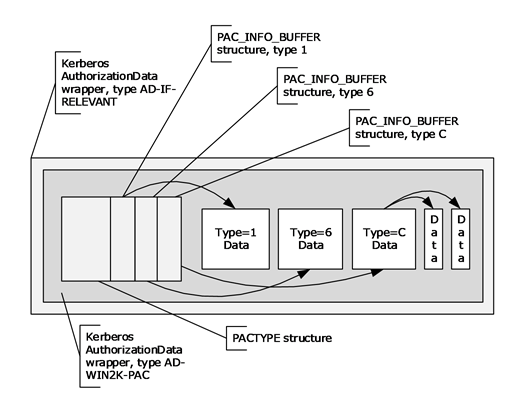
The module mainly provides the PAC data structures, shown below:
class KERB_SID_AND_ATTRIBUTES(NDRSTRUCT):
# used forSIDand inKERB_VALIDATION_INFOused forcontaining SID groupinformation

class KERB_SID_AND_ATTRIBUTES_ARRAY(NDRUniConformantArray):
class PKERB_SID_AND_ATTRIBUTES_ARRAY(NDRPOINTER):

class DOMAIN_GROUP_MEMBERSHIP(NDRSTRUCT):
# domaingroupinPAC_DEVICE_INFO

class DOMAIN_GROUP_MEMBERSHIP_ARRAY(NDRUniConformantArray):
class PDOMAIN_GROUP_MEMBERSHIP_ARRAY(NDRPOINTER):

class PACTYPE(Structure):
# PACTYPE PAC specified PAC_INFO_BUFFERgroup PACTYPE PAC

class PAC_INFO_BUFFER(Structure):
# inPACTYPEPAC_INFO_BUFFERgroup PAC PAC_INFO_BUFFERgroup thisPAC_INFO_BUFFER (KDC) servernotthen PAC


class KERB_VALIDATION_INFO(NDRSTRUCT):
# KERB_VALIDATION_INFO DC userinformation KERB_VALIDATION_INFOisasgroupinPACTYPE BuffersgroupPAC_INFO_BUFFER OffsetspecifiedPAC_INFO_BUFFER ulTypesetsas 0x00000001
# KERB_VALIDATION_INFO NETLOGON_VALIDATION_SAM_INFO4 outputand Active Directory thisinformationNTLM inserverwithdomain NETLOGON_VALIDATION_SAM_INFO4 this KERB_VALIDATION_INFO including NTLM and NTLM notused for [MS-KILE] KERB_VALIDATION_INFO RPC [MS-RPCE] group

class PKERB_VALIDATION_INFO(NDRPOINTER):

class PAC_CREDENTIAL_INFO(Structure):
# PAC_CREDENTIAL_INFOinformationPAC_CREDENTIAL_INFOused forIDLPAC_CREDENTIAL_DATAcontaininguserthisnotis[MS-KILE] method Kerberos AS-REQPAC_CREDENTIAL_INFOcontaininguser AS PKINITcontaining PAC thisAS reply key PKINIT output

class SECPKG_SUPPLEMENTAL_CRED(NDRSTRUCT):
# nameandthe
class SECPKG_SUPPLEMENTAL_CRED_ARRAY(NDRUniConformantArray):

class PAC_CREDENTIAL_DATA(NDRSTRUCT):
# group Kerberos client

class NTLM_SUPPLEMENTAL_CREDENTIAL(NDRSTRUCT):
# used for NTLM LAN Manager(LM OWF)NT(NT OWF).PAC the[MS-NLMP]specifiedinformation PKINIT [MS-PKCA] usercontaining PAC NTLM_SUPPLEMENTAL_CREDENTIAL RPC [MS-RPCE]

class PAC_CLIENT_INFO(Structure):
# PACcontainingclientnameused for PAC ticketclientPAC_CLIENT_INFO in PACTYPE Buffers groupBuffersgroupPAC_INFO_BUFFEROffset specifiedPAC_INFO_BUFFERulType setsas 0x0000000A

class PAC_SIGNATURE_DATA(Structure):
# PAC_SIGNATURE_DATAserverKDC PACPACTYPE BuffersgroupBuffersgroupPAC_INFO_BUFFER Offsetspecified PAC_INFO_BUFFERulTypecontaining0x00000006PAC_INFO_BUFFERulType KDC containing 0x00000007 PAC is[MS-KILE] PAC asused for KDC can PAC

class S4U_DELEGATION_INFO(NDRSTRUCT):
# S4U_DELEGATION_INFOused forinformation outputthis Kerberos clientorserverthelistused foruser (S4U2proxy)thiscanin

class UPN_DNS_INFO(Structure):
# containingclient UPN realm (FQDN)SAM name SIDused forwithticketclient UPNFQDNSAM name SIDUPN_DNS_INFOin PACTYPE groupgroup PAC_INFO_BUFFERspecified PAC_INFO_BUFFERulTypesetsas 0x0000000C

class PAC_CLIENT_CLAIMS_INFO(Structure):
# PAC thecontainingclientgroup blobPAC_CLIENT_CLAIMS_INFO in PACTYPEBuffers group,BuffersgroupPAC_INFO_BUFFER Offsetspecified PAC_INFO_BUFFERulTypesetsas 0x0000000D

class PAC_DEVICE_INFO(NDRSTRUCT):
# PAC thecontainingDCinformationPAC_DEVICE_INFOisasgroupinPACTYPE groupPAC_INFO_BUFFER specifiedPAC_INFO_BUFFERulTypesetsas 0x0000000E

class PAC_DEVICE_CLAIMS_INFO(Structure):
# PAC thecontainingclientgroupblobPAC_DEVICE_CLAIMS_INFO in PACTYPE Buffers group BuffersgroupPAC_INFO_BUFFER Offsetspecified PAC_INFO_BUFFERulTypesetsas 0x0000000F

class VALIDATION_INFO(TypeSerialization1):
/examples/getPac.py uses it to parse the received PAC data:
class S4U2SELF:

    def printPac(self, data):
        # (1) decode the ticket enc-part and pull the PAC out through AD_IF_RELEVANT
        encTicketPart = decoder.decode(data, asn1Spec=EncTicketPart())[0]
        adIfRelevant = decoder.decode(encTicketPart['authorization-data'][0]['ad-data'], asn1Spec=AD_IF_RELEVANT())[
            0]
        # So here we have the PAC
        pacType = PACTYPE(adIfRelevant[0]['ad-data'].asOctets())
        buff = pacType['Buffers']

        # (2) walk the PAC_INFO_BUFFERs and dispatch by ulType
        for bufferN in range(pacType['cBuffers']):
            infoBuffer = PAC_INFO_BUFFER(buff)
            data = pacType['Buffers'][infoBuffer['Offset']-8:][:infoBuffer['cbBufferSize']]
            if logging.getLogger().level == logging.DEBUG:
                print("TYPE 0x%x" % infoBuffer['ulType'])
            if infoBuffer['ulType'] == 1:
                # (3) logon info (KERB_VALIDATION_INFO): skip the 4-byte pointer ReferentID, then parse the NDR structure
                type1 = TypeSerialization1(data)
                newdata = data[len(type1)+4:]
                kerbdata = KERB_VALIDATION_INFO()
                kerbdata.fromString(newdata)
                kerbdata.fromStringReferents(newdata[len(kerbdata.getData()):])
                kerbdata.dump()
                print('Domain SID:', kerbdata['LogonDomainId'].formatCanonical())
            # the remaining types (CLIENT_INFO / SERVER_CHECKSUM / PRIVSVR_CHECKSUM / UPN_DNS_INFO)
            # only dump in DEBUG mode and share the same shape as above — omitted
            elif infoBuffer['ulType'] == PAC_CLIENT_INFO_TYPE:
                ......
            elif infoBuffer['ulType'] == PAC_SERVER_CHECKSUM:
                ......
            elif infoBuffer['ulType'] == PAC_PRIVSVR_CHECKSUM:
                ......
            elif infoBuffer['ulType'] == PAC_UPN_DNS_INFO:
                ......
            else:
                hexdump(data)

            buff = buff[len(infoBuffer):]